Showing posts with label ADF. Show all posts

Sunday, May 5, 2013

af:region/taskflow lazy loading with loading message

I have a page where I consumed a taskflow as region. Sometimes this taskflow takes few more seconds extra where the entire page rendering is waiting just for this taskflow.

I was looking for something like let the whole page render first, then the region should show loading and it should make another request to render its actual view activity. So that the user can see rest of the page and let the region loads on its own as soon as ready.

I was looking for something out of the box from ADF but I don't see any property for this. So here is my own way of implementation to achieve that.

This is my actual page(Home.jspx):


Here all the content is from Home.jspx and the right side is info region (InfoTF). This region I need to load it lazily.

Created a taskflow template(LazyLoadingTFTemplate) with a switcher & view activity. It has a boolean parameter EnableLazyLoading.


The switcher will check if the parameter EnableLazyLoading is true go to Loading page otherwise Next switcher.

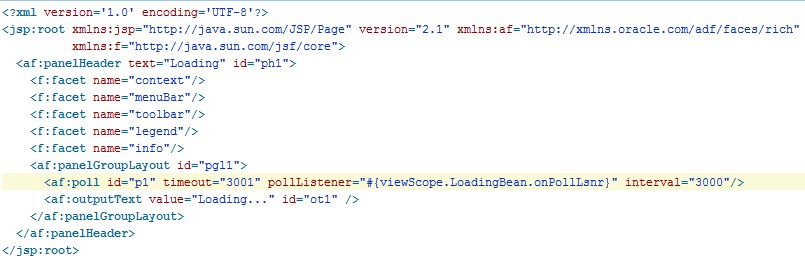
Loading page has output text : Loading (put your own loading image if needed) and a poll component with a listener set to 3 seconds.


And the poll listener makes programmatic navigation to next..

Now the info taskflow InfoTF will extend  LazyLoadingTFTemplate and its default activity is set to EnableLazyLoading switcher.


Also it has a control flow from Next(via template) to Info view activity


Thats it. Drag & drop InfoTF on Home.jspx as region and set EnableLazyLoading parameter to true. Run the page.


and after 3 seconds


Note : After 3 seconds when the poll component request(r1) is in progress when user makes some changes on main area which initiates another request(r2) then r2 will get the response only after r1's response. Figuring out how to make r1 async so that r2 will not wait for r1.


Above implementation code is uploaded here.

Happy ADF Coding..

Sunday, April 21, 2013

Life of Dynamic View Object & Entity Object Across Passivation/Activation

For one of the requirement I use Dynamic VO & EO along with dynamic form extensively. This works perfectly until the AM passivates. But when it activates it started throwing exception:

javax.el.PropertyNotFoundException: Target Unreachable, 'DynamicForm_dynamic_VO_form1' returned null

This issue is visible only on JDeveloper 11.1.2.0.0 & even it exists in later versions but its hidden by some other bug as per Oracle dev.

Looking into the code deeper.. I have put my code as per dev guide:


private static final String DYNAMIC_EO = "dynamic.EO";
private static final String DYNAMIC_VO = "dynamic.VO";
private static final String DYNAMIC_VO_INSTANCE_INTERNAL = "DynamicVOInternal";


//Entity creation
EntityDefImpl newEntity = new EntityDefImpl(DYNAMIC_EO);
newEntity.setSource("TEST_TABLE");

//Code for AttributeDefImpl creations..

newEntity.resolveDefObject();

newEntity.registerDefObject();

//ViewDef creation

ViewDefImpl newView = new ViewDefImpl(DYNAMIC_VO);
newView.addEntityUsage("e", DYNAMIC_EO, false, false);
newView.addAllEntityAttributes("e");

newView.resolveDefObject();
newView.registerDefObject();

//ViewObject instance creation
ViewObject dynmVO = createViewObject(DYNAMIC_VO_INSTANCE_INTERNAL, DYNAMIC_VO);

And this view instance is used for dynamic form in UI. Debugged and found that the View Instance not exists after activation hence the above error is thrown. Why its not recreated, no clue so I reached back to Oracle.

It was one of my interesting technical discussion with Oracle.

When the def is created dynamically its called temporal def and its deleted at the time of passivation. The code pattern we used to create view def is by calling registerDefObject() is meant for a view def which is meant for a singleton VO, i.e., view def with one VO instance. When ADFbc see such a temporal view def, it delete the view def from memory when the singleton VO instance is removed. Because the framework doesn't know how to create the temporal view def back.

Since the view def does not exists after the activation the dynamic form throws above exception.

Below are few suggestions from Oracle.

First suggestion:
1. Set up the mds-config section in adf-config.xml to declare a proper MDS repos
2. On the above code replace:

newEntity.resolveDefObject();
newEntity.registerDefObject();

with
newEntity.resolveDefObject();
newEntity.writeXMLContents();
newEntity.saveXMLContents();
newEntity = EntityDefImpl.findDefObject(<full-EO-name>);

3. And replace
newView.resolveDefObject();
newView.registerDefObject();

with
newView.resolveDefObject();
newView.writeXMLContents();
newView.saveXMLContents();
newView = ViewDefImpl.findDefObject(<full-VO-name>);

Here the dynamic view def is stored in MDS so that its not considered as temporal def and also its not deleted when its getting passivated.

But I can't enable MDS just like that without doing complete re-test of my whole application. So I thought of storing the vo def at the time of passivation & recreate the same on my own overidding prepareForActivation. Reached Oracle with this suggestion and they provided another good suggestion:

Second suggestion:
If the dynamic eo & vo is created with a package and put the def object in a package, then the view def is not considered temporal view def any more. So, the view def is not deleted when the VO instance is removed at the time of passivation and the vo instance will be recreated & available after activation. And the new code is:


private static final String DYNAMIC_PACKAGE = "dynamic";
private static final String DYNAMIC_EO = "EO";
private static final String DYNAMIC_VO = "VO";

public void createDynamicViewDef(){
//Create dynamic package

        PackageDefImpl newPackage;
        java.lang.reflect.Method setParentMth;
        try {
            java.lang.reflect.Method mth = MetaObjectManager.class.getDeclaredMethod("createContainerDefObject", new Class[] { boolean.class });
         
            setParentMth = oracle.jbo.server.DefObject.class.getDeclaredMethod("setParent", new Class[] { oracle.jbo.common.NamedObjectImpl.class });
         
            mth.setAccessible(true);
         
            setParentMth.setAccessible(true);
         
            newPackage = (PackageDefImpl) mth.invoke(MetaObjectManager.getSingleton(), new Object[] { true });
        }catch(Exception ex) {
            throw new JboException(ex);
        }
     
        newPackage.setDefScope(PackageDefImpl.DEF_SCOPE_SESSION);
        newPackage.setName(DYNAMIC_PACKAGE);
        newPackage.setFullName(DYNAMIC_PACKAGE);
        MetaObjectManager.insertSessionMetaObject(newPackage.getFullName(), newPackage);

//Create Entity
        EntityDefImpl newEntity = new EntityDefImpl(DYNAMIC_EO);
        newEntity.setFullName(DYNAMIC_PACKAGE + "." + DYNAMIC_EO);
        try {
            setParentMth.invoke(newEntity, new Object[] { newPackage });
            }catch(Exception ex) {
                throw new JboException(ex);
            }
     
        newEntity.setSource("TEST_TABLE");

//Code for AttributeDefImpl creations..

        newEntity.resolveDefObject();
        newEntity.registerDefObject();

//Create ViewDef
        ViewDefImpl newView = new ViewDefImpl(DYNAMIC_VO);
        newView.setFullName(DYNAMIC_PACKAGE + "." + DYNAMIC_VO);      
        try {
            setParentMth.invoke(newView, new Object[] { newPackage });
        }catch(Exception ex) {
            throw new JboException(ex);
        }
       
        newView.addEntityUsage("e", newEntity.getFullName(), false, false);      
        newView.addAllEntityAttributes("e");

        newView.resolveDefObject();
        newView.registerDefObject();
}

//Create ViewObject Instance
        ViewObject dynmVO = createViewObject(DYNAMIC_VO_INSTANCE_INTERNAL, DYNAMIC_PACKAGE + "." + DYNAMIC_VO);

Thats it.. I have modified my code as per their second suggestion and it works perfectly...

Please note that when the AM gets activated in different node on a cluster then the view def needs to re-created. Override prepareForActivation and use the below code to recreate view def:

    protected void prepareForActivation(Element element) {
        super.prepareForActivation(element);
        ViewDefImpl existing = null;
        try{
            existing = ViewDefImpl.findDefObject(DYNAMIC_PACKAGE + "." + DYNAMIC_VO);
        }
        catch(NoDefException ex){
            existing = null;
        }
     
        if (existing == null){
            this.createDynamicViewDef();
        }      
    }

None of the above information is available in dev guide and Oracle have logged an internal documentation bug to update the same.

All the above discussions are tracked on
Bug 16320619 : DYNAMIC FORM WITH DYNAMIC VO & EO THROWS EXCEPTION ON PASSIVATION/ACTIVATION

Happy ADF Coding...!!


Thursday, July 26, 2012

Multiple Root Application Module to One Root Application Module

Was quite busy in AM pooling and database connections issue.. but interesting issue..

3 years back somebody designed my application with 7 root AM's and its working fine with few users... but in next few months we are going to have 300+ concurrent users..

We don't want to..
 - take 2100 database connections..
 - have frequent activation and passivation..
 - change the application design to have one main taskflow and let all other task flow to share the transaction...

And we just got 4 weeks to fix this... What is the option I left with.. Create a new root application module and make existing 7 AM's nested.. but we got more than 200 pageDef.. I need atleast 4 months to change everything declaratively and test it thoroughly.. not enough time to do this..


So what I have done is.. Created a new sample application with one root AM and one nested AM.. created a task flow and a page with all kinds of bindings declaratively... closely observed the patterns in pageDef files.. Just following the pattern and wrote a small piece of java code which will replace all the pageDef root AM references to use nested AM references.. And yes it worked out.. Just one day coding and 3 weeks testing.. Now on average 1 User 1 DB Connection... I think the best way would be xslt but I'm not familiar with that and I don't have much time to experiment that.. So went with my favorite java code..


I'm sure the same situation will be faced by other developers also.. So I'm sharing my code here.. Just follow the below steps:


1. Create a new Application Module (Say TestRootAM) and make all your existing AM's as nested of RootAM.


2. Create a datacontrol usage in DataBindings.cpx for the new AM. (Simple way is to drag and drop an attribute from a nested AM which will create this entry automatically) Also remove all other datacontrol usages from DataBindings.cpx


3. Download my java code and set proper value for variables
ROOT_AM_NAME (new AM name TestRootAM ) and 
ROOT_DIR (root directory of pageDef files) 
and then run it.. It will replace all root AM references to use nested AM references.

4. Test your application and make sure everything works fine.

Do not forget to change the new AM configurations..

That's it now my application code/design looks same as if it would have been implemented declaratively via jdeveloper with one root AM and multiple nested AM.

In future if you don't want to make any other AM's as root AM then hide all nested AM data controls as per my earlier post.

Also this script will fix Oracle ADF Bug 13837650 which I mentioned in my earlier post.

Good luck and incase if you find any issues in my script please put your comments so that I will modify it. 

Note : Please note that I'm just sharing the code for reference and its your responsibility to use this and test your application thoroughly.

Thiru

Saturday, June 30, 2012

Bind values set for a VO on nested AM method call activity is not reflected in my page

And finally my first informative post is here:

When you have a taskflow which does not share datacontrol 


and it has a methodCall and view activities.


Here if this method call activity is created from a nested AM then the pageDef binding will be:


With this code the bind parameters set on the method call activity will not be reflected in the view activity. 

The reason is ADF creates 2 application modules here, one for method call activity and another for view activity. So the view object in view activity does not have the bind parameters applied in method call activity.

This issue is due to 'Root' keyword in instanceName attribute.

Change the instance name attribute from:   
    InstanceName="AppRootAMDataControl.dataProvider.Root.DeptEmpAM1">
to 
    InstanceName="AppRootAMDataControl.dataProvider.DeptEmpAM1"

to fix this issue.

Initially I was wondering why the bind parameters are lost and after some detailed analysis I found that both are different AM instances and logged SR with reproducible test case. Then Oracle Support asked me to remove the Root keyword and also they confirmed that the issue will be fixed via 
Bug 13837650: REMOVE ROOT FROM THE INSTANCE NAME OF METHODACTION BINDING

Looks like this bug is planned for JDeveloper 12.1 release, till that time if you create action or MethodAction make sure that Root is removed manually.

For my detailed analysis and reproducible test case refer my Oracle Forum Post.